Future Students Alumni Library Athletics & Recreation
 Mobile
Students
  • Academics
    • Academic Support and Advising
    • Convocation and Graduation
    • Exams
    • Global Engagement and Exchanges
    • Graduate and Postdoctoral Studies
    • Library
    • Programs
    • Records and Registration
    • Research
    • Virtual Asynchronous Learning
  • Support and Wellness
    • Equity, Diversity and Inclusion
    • Gendered Violence Prevention and Support
    • Human Rights and Conflict Management
    • Indigenous Student Services
    • International Student Support
    • Orientation
    • Student Affairs
    • Student Wellness Centre
  • Career and Experiential Learning
    • Career and Employment Support
    • Community and Workplace Partnerships
    • Co-op
    • Experience Record
    • Innovation, Entrepreneurship and Changemaking
    • Working on Campus
    • Volunteering
  • Finances
    • Financial Aid
    • Graduate Funding and Awards
    • Money Management
    • Scholarships and Bursaries
    • Tuition and Fees
  • Campus Services
    • Classrooms and Spaces
    • Dining on Campus
    • OneCard
    • Parking and Transportation
    • Printing Services
    • Residence and Off-Campus Housing
    • Retail and Mail Services
    • Safety
    • Sustainability
    • Tech Services

    • Home
    • Campus Services
    • Tech Services
    • Cyber Security Awareness Month Week 2: Tricks and Threats of The Moment

    Cyber Security Awareness Month Week 2: Tricks and Threats of The Moment

    Oct. 8, 2026
    Print | PDF

    Dear Laurier Community,

    Technology and the world of cyber-crime is constantly changing, which means that we always need to prepare for new types of cyber threats as cyber-criminals seek access to your private data, accounts, and devices. Here is a list of some of the most common threats we’ve been observing at Laurier this term, as well as tips on how you can protect yourself from each of them.

    ClickFix

    ClickFix is a form of a “social engineering” attack that occurs when a cyber-criminal tricks users into running malicious commands on their own computers. They’re most commonly encountered when trying to access legitimate websites that have been hacked by the scammer and had malicious instructions inserted.
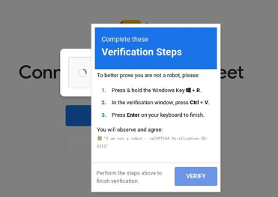
    Example of a ClickFix cyber attack, including instructions for the user to prove they are not a robot through a series of keyboard commands

    Running these malicious commands often downloads malware that can steal documents or passwords, spy on the user’s activity, or allow the hacker to control their victim’s computer remotely.

    Vishing and Teams Impersonation Calls

    Vishing (voice phishing) through Teams calls or traditional phone calls are becoming prominent at Canadian universities. Vishing callers can often impersonate members of ICT and ask for passwords or request remote access to your computer, or they may take the form of a caller asking you to perform financial transactions or request privileged information.

    Most of us are aware of the threat of phishing attempts via email and how these messages should be handled. However, vishing has traditionally been less common than email phishing, and can also feel more immediate and urgent, means it may be more likely to catch us off-guard.

    Financial Fraud

    It may come as no surprise that most cyber-criminals are in it for the money: The Canadian Anti-Fraud Centre logged $704 million lost by Canadians to fraud in 2025, with actual estimated losses as high as 7 billion dollars (as only 5-10% of fraud is actually reported by victims). Chief among these are cyber-fraud schemes including the following:

    • Romance scams: A scammer strikes a romance via a dating site or social media, using the opportunity to gather money. This may mean asking the victim to pay transportation costs for visits that never happen or asking for expensive gifts.
    • Employment scams: A scammer poses as an employer and tricks hopeful job applicants into depositing bad cheques or acting as a “money mule” for stolen funds.
    • Gift-card scams: The scammer impersonates a manager or supervisor and “asks a favor” from the recipient, usually meaning the purchase of digital gift cards for which the individual is left liable.
    • “Free Piano” scams: A scammer offers to give away an expensive, but large or heavy item like a grand piano or power tools, while asking their victim to pay shipping costs. The item never arrives, and the scammer defrauds the individual of the shipping fees. Universities like Laurier often face a similar scam involving “free” course textbooks or Laurier merchandise.

    Stay Cyber Safe

    Report all suspicious email to the ICT Cyber Security Team at reportspam@wlu.ca or any general cybersecurity questions to cyberhawk@wlu.ca. Verify any suspicious account charges by contacting your financial institution directly, and be wary of any job offer or unexpected message asking you to handle financial transactions.

    Contact Us:

    E: cyberhawk@wlu.ca

    Unknown Spif - $key
    Wilfrid Laurier University Logo Wilfrid Laurier University Logo Mobile
    • Locations, Maps & Parking
    • Campus Status
    • Campus Safety
    • Accessibility
    Contact UsSocial Media Directory
    © 2026 Wilfrid Laurier University

    We use cookies on this site to enhance your experience.

    By selecting “Accept” and continuing to use this website, you consent to the use of cookies.